> ## Documentation Index
> Fetch the complete documentation index at: https://berachain-422fce37-mintlify-1066267a.mintlify.site/llms.txt
> Use this file to discover all available pages before exploring further.

# Borrow & Repay

> Supply collateral, borrow HONEY, monitor LTV/LLTV, and repay to withdraw collateral on Bend.

Follow these steps to supply collateral, borrow \$HONEY, and repay to free your collateral.

## Requirements

* Wallet with collateral (WETH, WBERA, WBTC, etc.) listed on [Bend](https://bend.berachain.com/borrow)
* Native \$BERA for transaction fees

<Tip>If you don't have collateral, swap on [Berachain Hub](https://hub.berachain.com/swap).</Tip>

## Supply collateral and borrow

Supply $WBERA as collateral and borrow $HONEY.

<Steps>
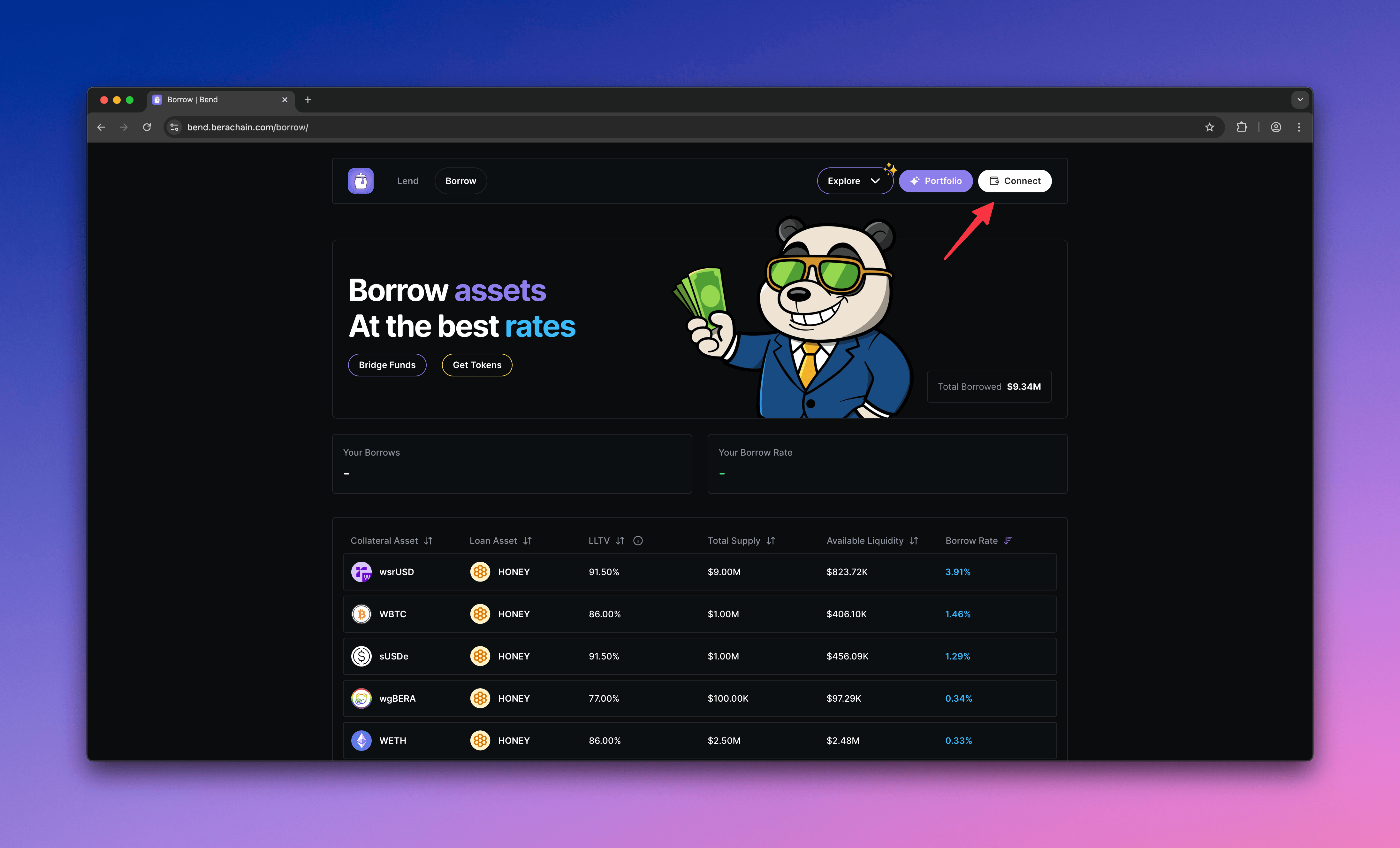
  <Step title="Visit Bend and connect wallet">
    Go to [Bend](https://bend.berachain.com/borrow) and connect your wallet.
    <Frame>
      <img src="https://mintcdn.com/berachain-422fce37-mintlify-1066267a/2yeg5lmXXotdcONe/images/bend/borrow-connect-wallet.png?fit=max&auto=format&n=2yeg5lmXXotdcONe&q=85&s=52bbc8a0cfffacbac00ecd414ffe230c" alt="Bend borrow connect wallet" width="4384" height="2654" data-path="images/bend/borrow-connect-wallet.png" />
    </Frame>
  </Step>

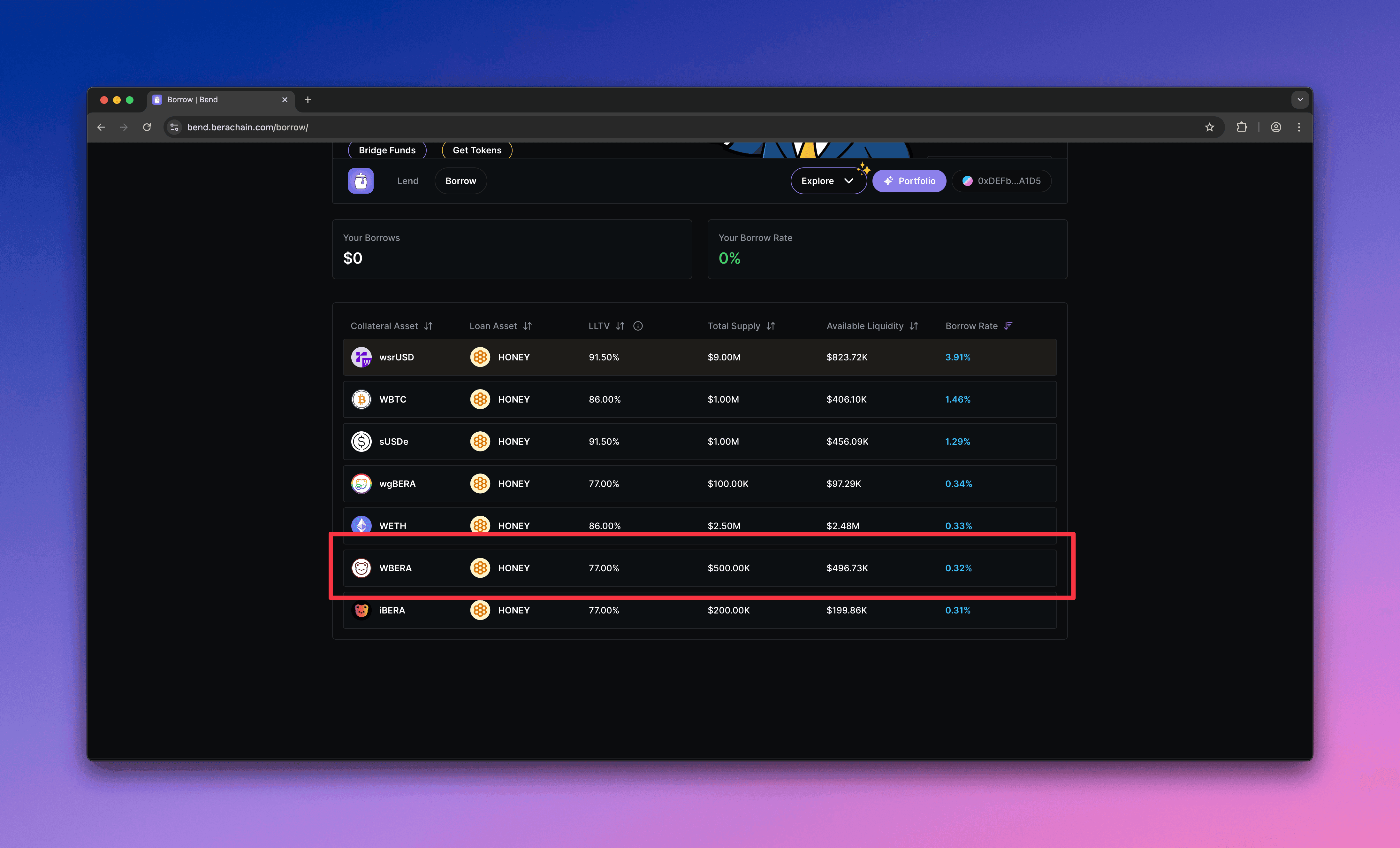
  <Step title="Choose a market">
    Choose a market where you can supply collateral. This guide uses \$WBERA.
    <Frame>
      <img src="https://mintcdn.com/berachain-422fce37-mintlify-1066267a/2yeg5lmXXotdcONe/images/bend/borrow-choose-market.png?fit=max&auto=format&n=2yeg5lmXXotdcONe&q=85&s=cc28d762c52bd8693dae3177c5900c55" alt="Bend choose market" width="4384" height="2654" data-path="images/bend/borrow-choose-market.png" />
    </Frame>
  </Step>

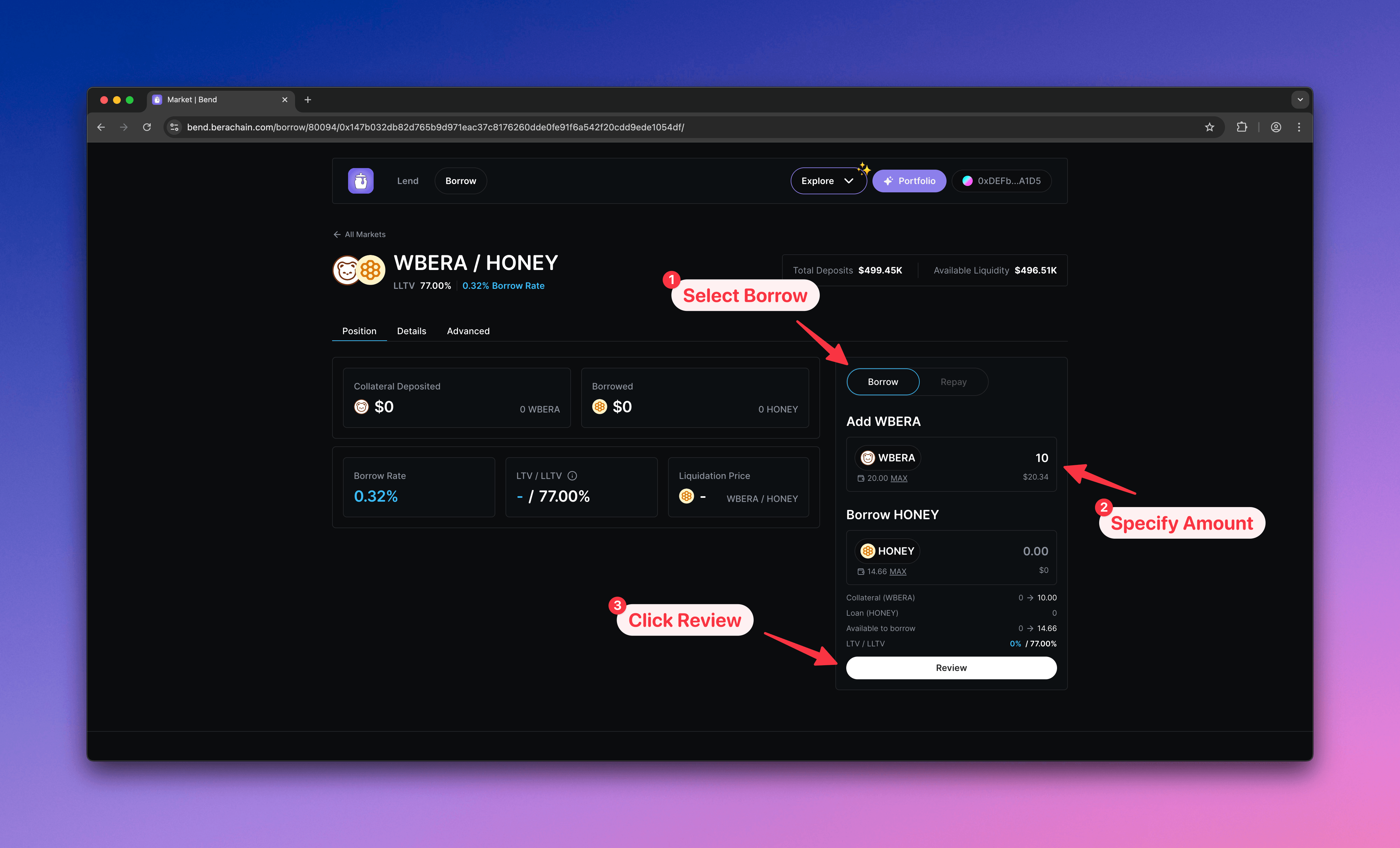
  <Step title="Configure borrow">
    1. Select **Borrow**
    2. Enter the \$WBERA amount to supply as collateral
    3. Click **Review** to open the confirmation modal
    <Frame>
      <img src="https://mintcdn.com/berachain-422fce37-mintlify-1066267a/2yeg5lmXXotdcONe/images/bend/borrow-configure-borrow.png?fit=max&auto=format&n=2yeg5lmXXotdcONe&q=85&s=e0a9af69f3cd84878490fd54543ebfa2" alt="Bend configure borrow" width="4384" height="2654" data-path="images/bend/borrow-configure-borrow.png" />
    </Frame>
  </Step>

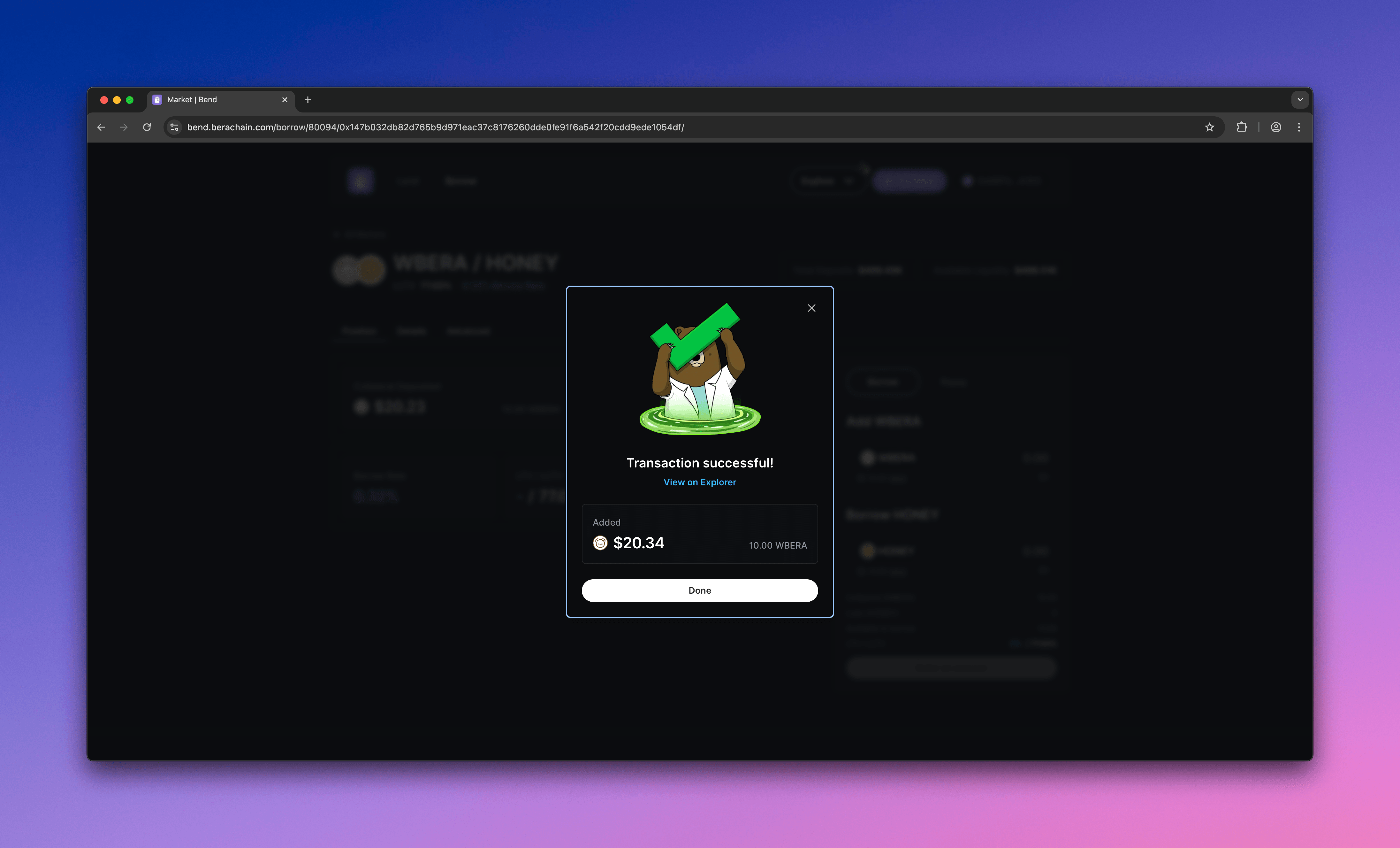
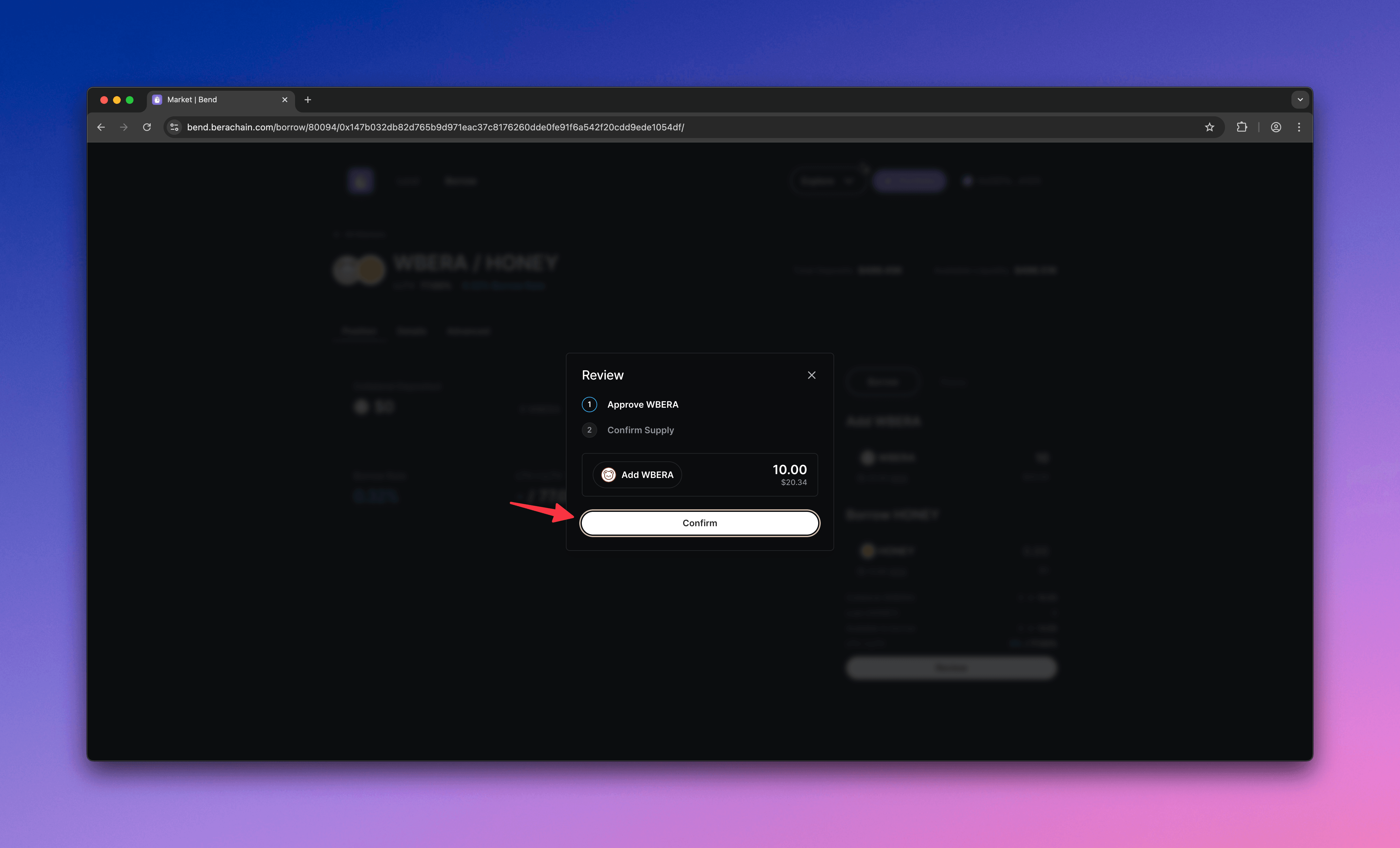
  <Step title="Approve and supply">
    1. Approve the market to spend your \$WBERA
    2. Supply \$WBERA as collateral
    <Frame>
      <img src="https://mintcdn.com/berachain-422fce37-mintlify-1066267a/2yeg5lmXXotdcONe/images/bend/borrow-approve-supply.png?fit=max&auto=format&n=2yeg5lmXXotdcONe&q=85&s=e6d7ea83ea94bb93056666ae2f8afca4" alt="Bend approve and supply" width="4384" height="2654" data-path="images/bend/borrow-approve-supply.png" />
    </Frame>

    <Frame>
      <img src="https://mintcdn.com/berachain-422fce37-mintlify-1066267a/2yeg5lmXXotdcONe/images/bend/borrow-successful-approve-supply.png?fit=max&auto=format&n=2yeg5lmXXotdcONe&q=85&s=96631591313e4a57cce9e0913d3b9060" alt="Bend successful approve and supply" width="4384" height="2654" data-path="images/bend/borrow-successful-approve-supply.png" />
    </Frame>

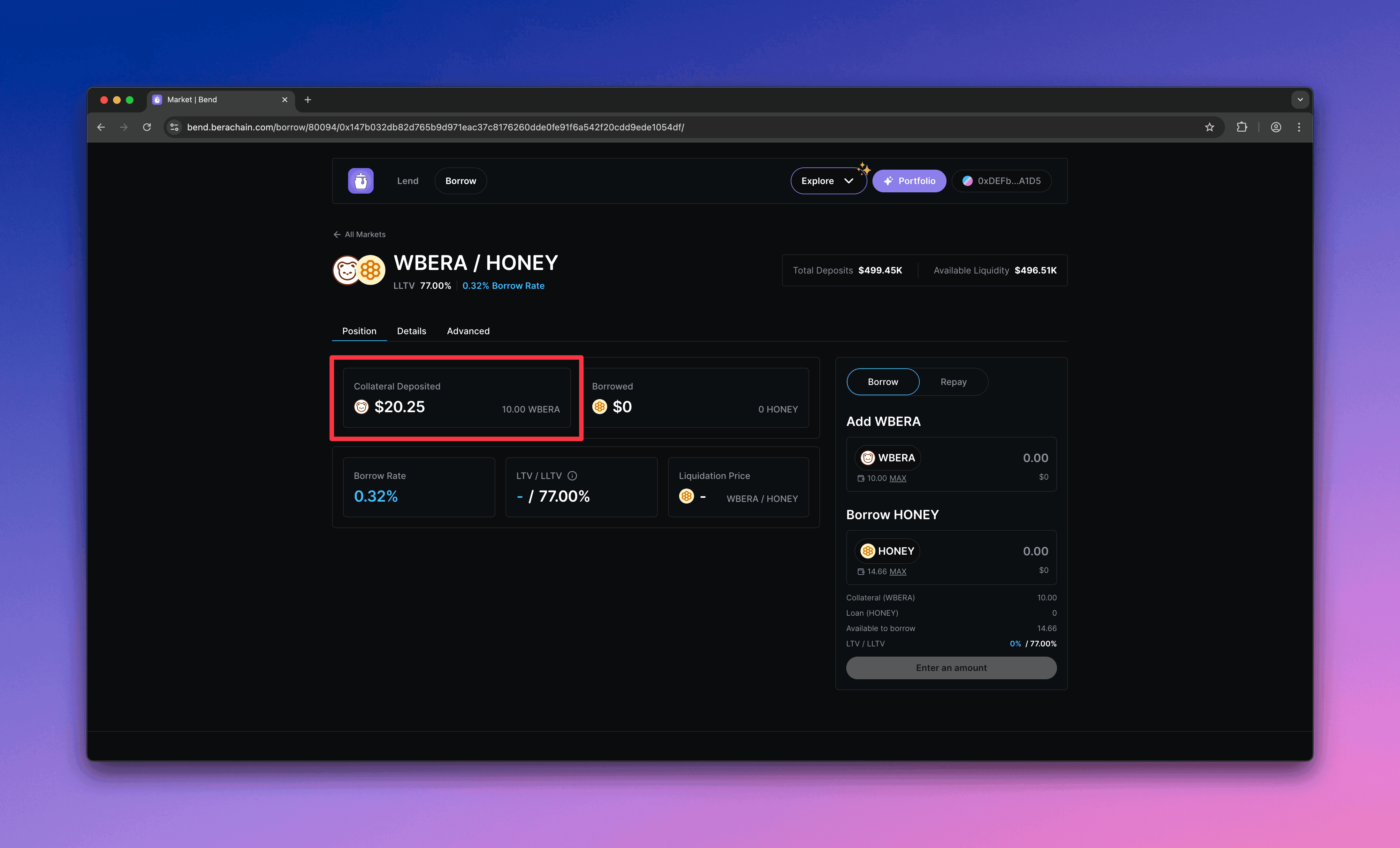
    You should see your supplied collateral and total value in the market.
    <Frame>
      <img src="https://mintcdn.com/berachain-422fce37-mintlify-1066267a/2yeg5lmXXotdcONe/images/bend/borrow-successful-supply.png?fit=max&auto=format&n=2yeg5lmXXotdcONe&q=85&s=e5984c3060fb0a5ab79af3fc335aa028" alt="Bend successful supply" width="4384" height="2654" data-path="images/bend/borrow-successful-supply.png" />
    </Frame>
  </Step>

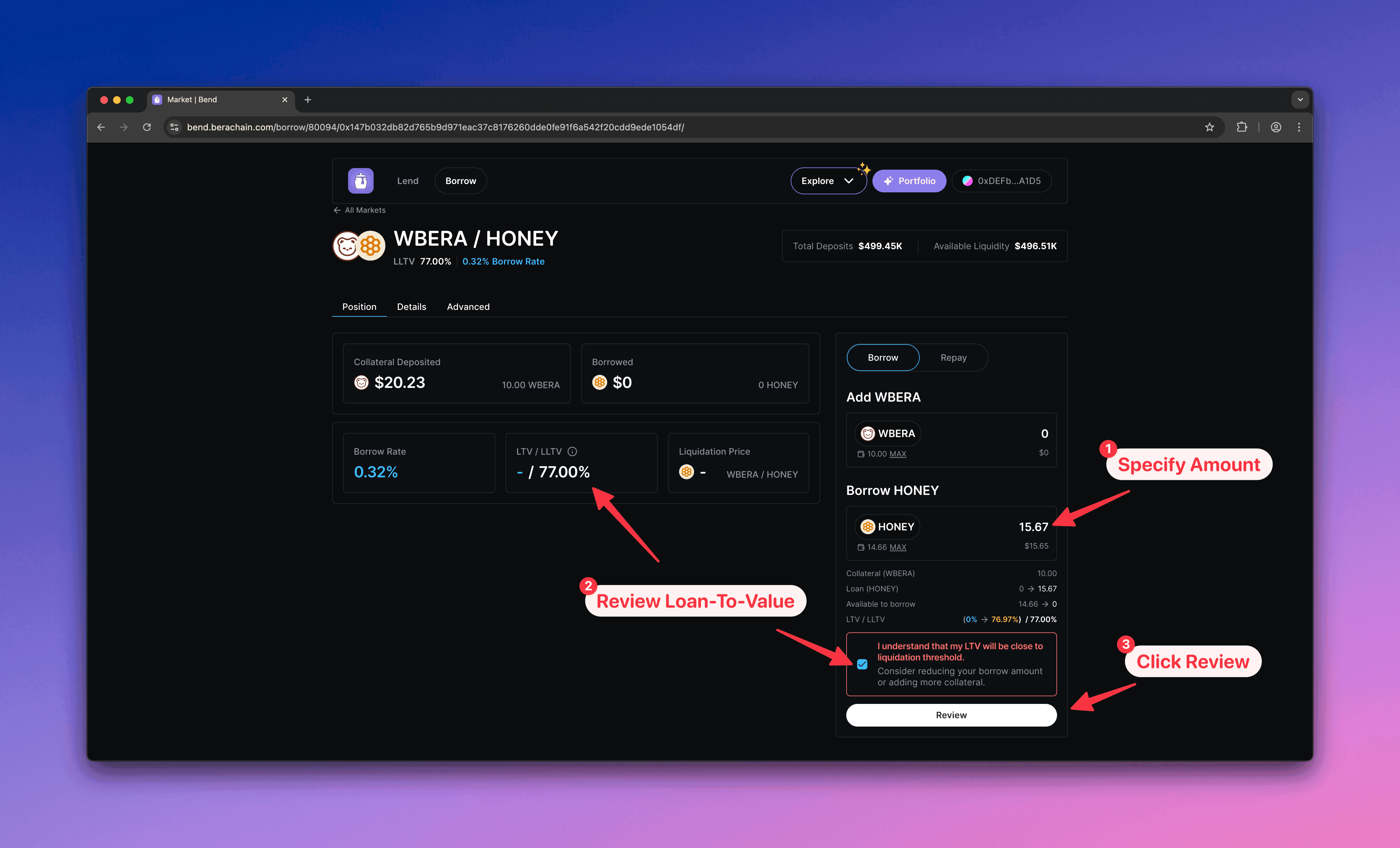
  <Step title="Borrow">
    1. Enter the \$HONEY amount to borrow
    2. Keep borrow below the LTV limit to avoid liquidation
    3. Click **Review** to confirm
    <Frame>
      <img src="https://mintcdn.com/berachain-422fce37-mintlify-1066267a/2yeg5lmXXotdcONe/images/bend/borrow-borrow.png?fit=max&auto=format&n=2yeg5lmXXotdcONe&q=85&s=940208f92ca1315fa5049aaa92212905" alt="Bend borrow" width="4384" height="2654" data-path="images/bend/borrow-borrow.png" />
    </Frame>
  </Step>

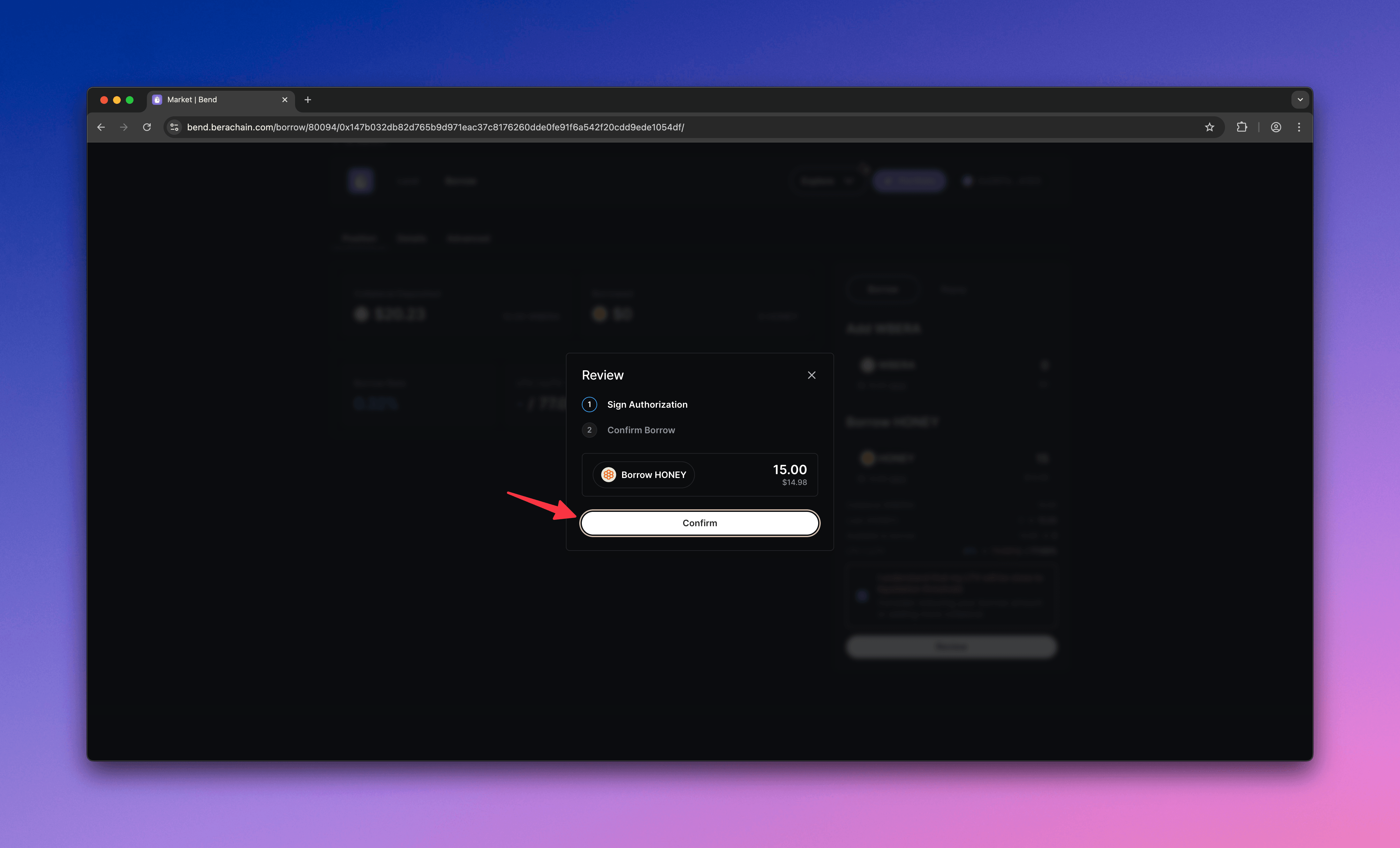
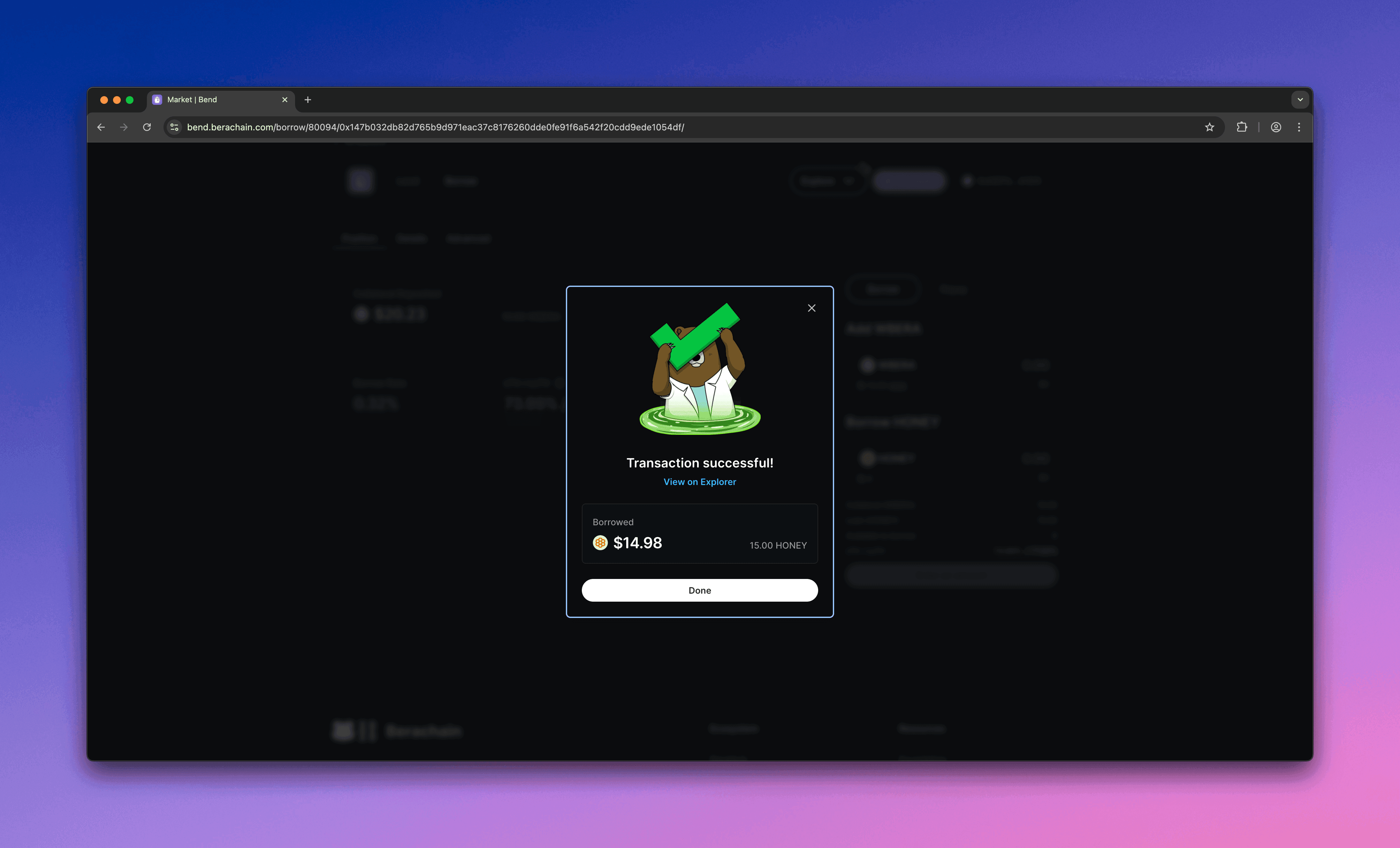
  <Step title="Approve and borrow">
    Approve the borrow in your wallet.

    <Frame>
      <img src="https://mintcdn.com/berachain-422fce37-mintlify-1066267a/2yeg5lmXXotdcONe/images/bend/borrow-approve-borrow.png?fit=max&auto=format&n=2yeg5lmXXotdcONe&q=85&s=e0ee5177a0023635cce7d4b1fd9aef11" alt="Bend approve borrow" width="4384" height="2654" data-path="images/bend/borrow-approve-borrow.png" />
    </Frame>

    <Frame>
      <img src="https://mintcdn.com/berachain-422fce37-mintlify-1066267a/2yeg5lmXXotdcONe/images/bend/borrow-successful-approve-borrow.png?fit=max&auto=format&n=2yeg5lmXXotdcONe&q=85&s=45eeed49ded24031204e38c5c6fe0b3e" alt="Bend successful approve borrow" width="4384" height="2654" data-path="images/bend/borrow-successful-approve-borrow.png" />
    </Frame>

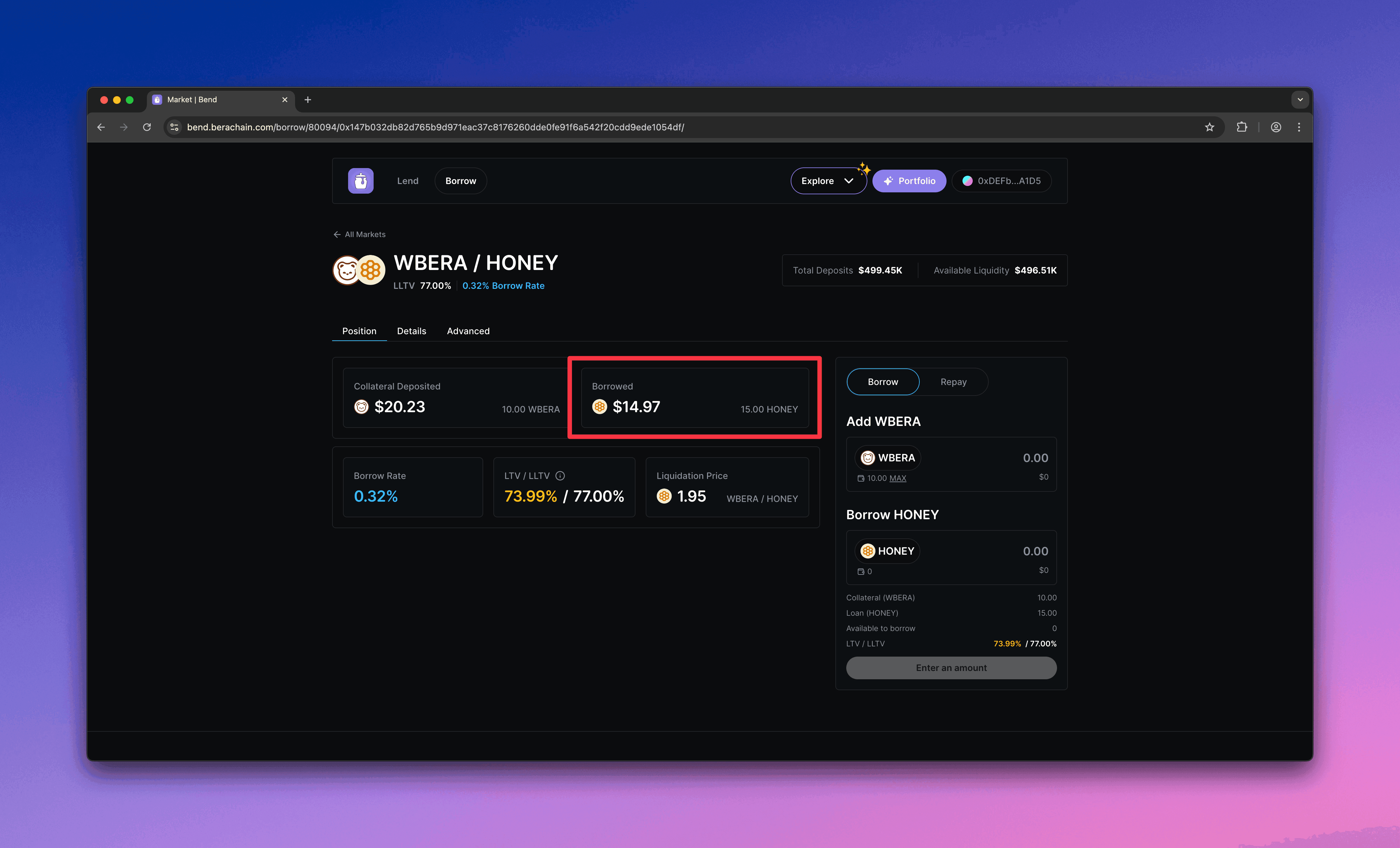
    You should see your borrowed \$HONEY and its value in the market.
    <Frame>
      <img src="https://mintcdn.com/berachain-422fce37-mintlify-1066267a/2yeg5lmXXotdcONe/images/bend/borrow-successful-borrow.png?fit=max&auto=format&n=2yeg5lmXXotdcONe&q=85&s=c8b542f7c31125b219dfb3f670d7330b" alt="Bend successful borrow" width="4384" height="2654" data-path="images/bend/borrow-successful-borrow.png" />
    </Frame>
  </Step>

  <Step title="Avoid liquidation">
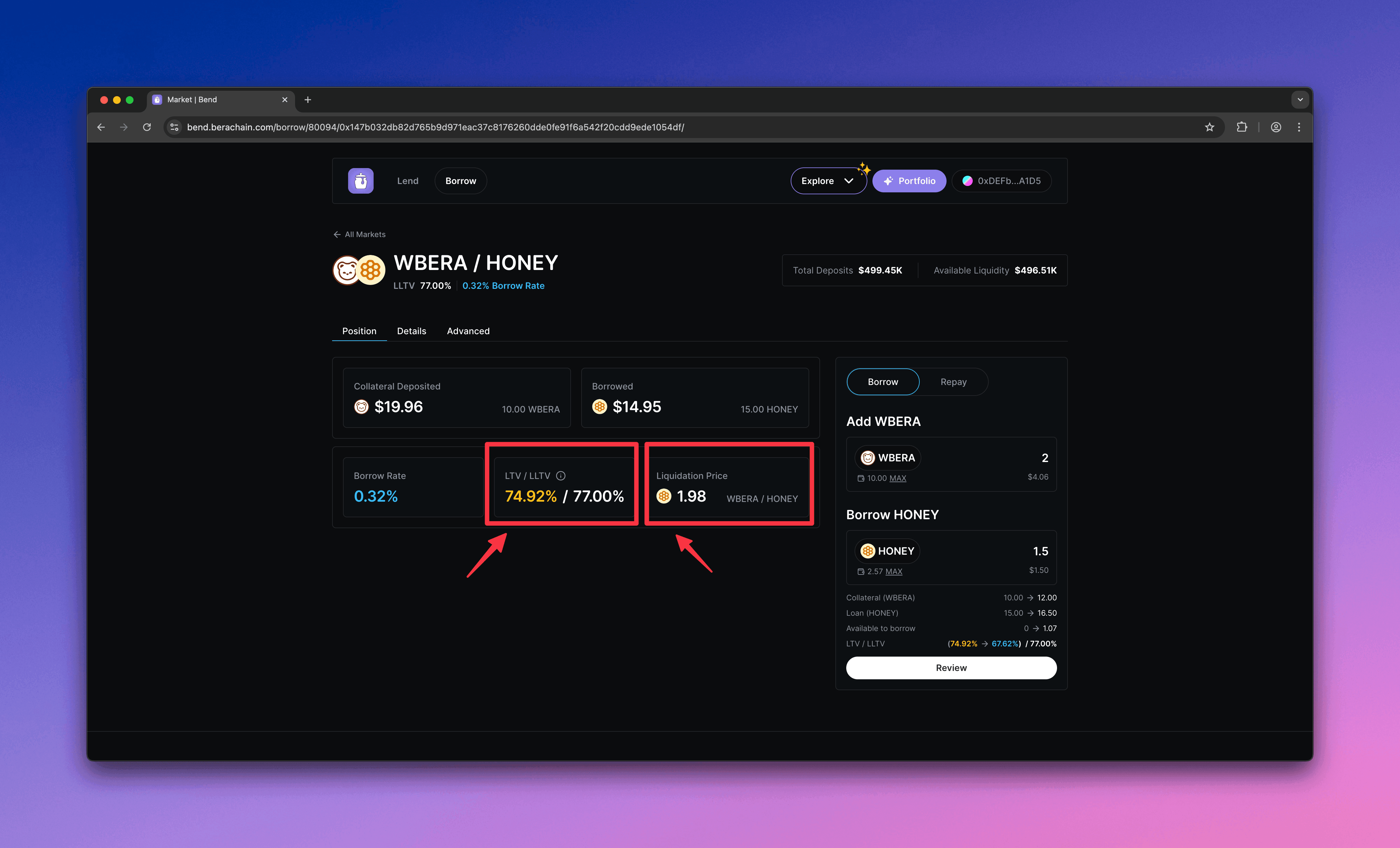
    Monitor your position. If your LTV exceeds the Liquidation LTV (LLTV), your position can be liquidated.
    <Frame>
      <img src="https://mintcdn.com/berachain-422fce37-mintlify-1066267a/2yeg5lmXXotdcONe/images/bend/borrow-monitor-ltv-lltv.png?fit=max&auto=format&n=2yeg5lmXXotdcONe&q=85&s=4a898853c6fbf33b639fe59a7950ed05" alt="Bend monitor LTV and LLTV" width="4384" height="2654" data-path="images/bend/borrow-monitor-ltv-lltv.png" />
    </Frame>
  </Step>
</Steps>

## Repay and withdraw

Repay $HONEY and withdraw your $WBERA collateral.

<Steps>
  <Step title="Configure repay">
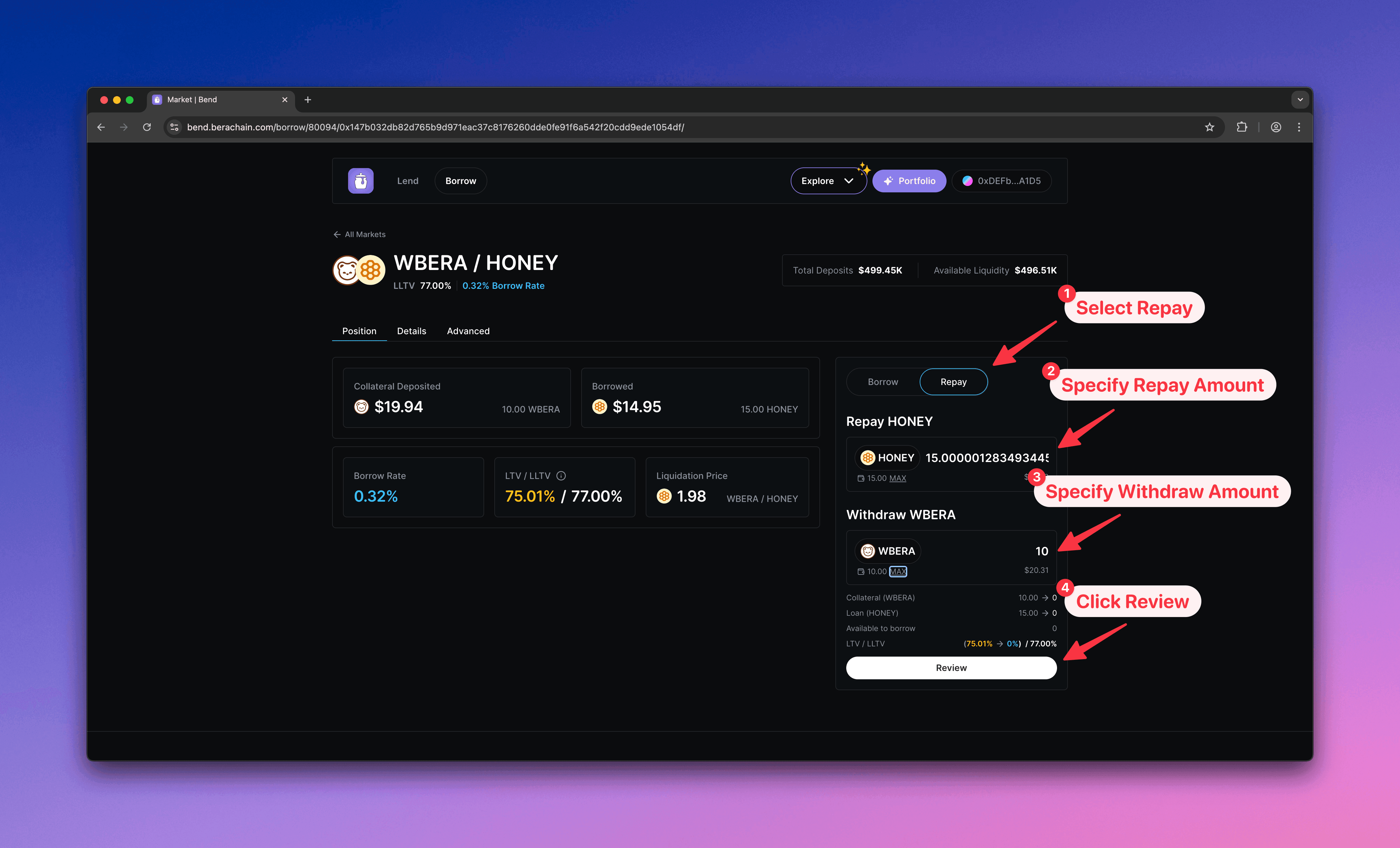
    1. Select **Repay**
    2. Enter the \$HONEY amount to repay
    3. Enter the \$WBERA amount to withdraw
    4. Click **Review** to open the confirmation modal
    <Frame>
      <img src="https://mintcdn.com/berachain-422fce37-mintlify-1066267a/2yeg5lmXXotdcONe/images/bend/repay-configure-repay.png?fit=max&auto=format&n=2yeg5lmXXotdcONe&q=85&s=e22f59bd70f5502273a8b141ce97dd01" alt="Bend configure repay" width="4384" height="2654" data-path="images/bend/repay-configure-repay.png" />
    </Frame>
  </Step>

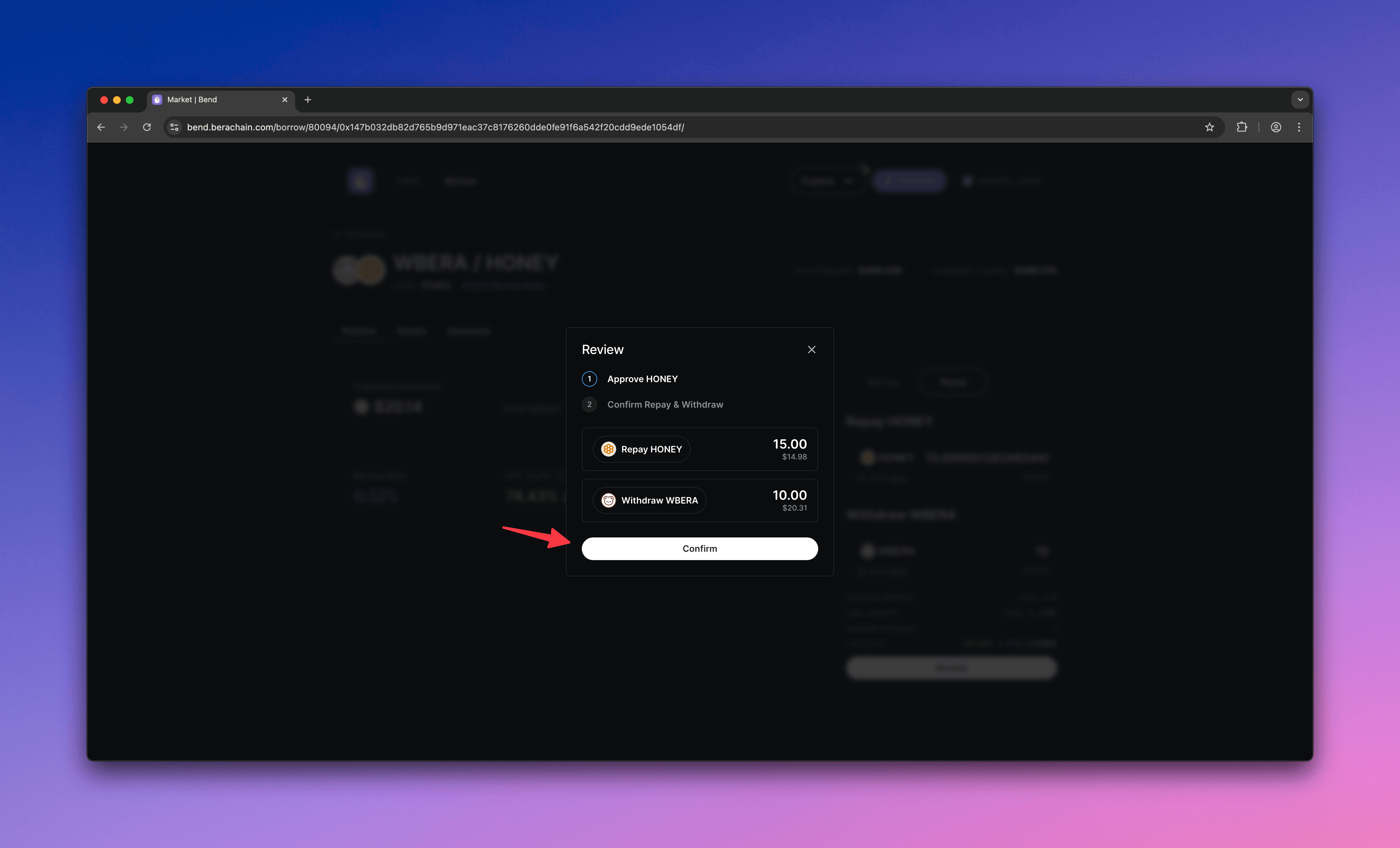
  <Step title="Confirm repay">
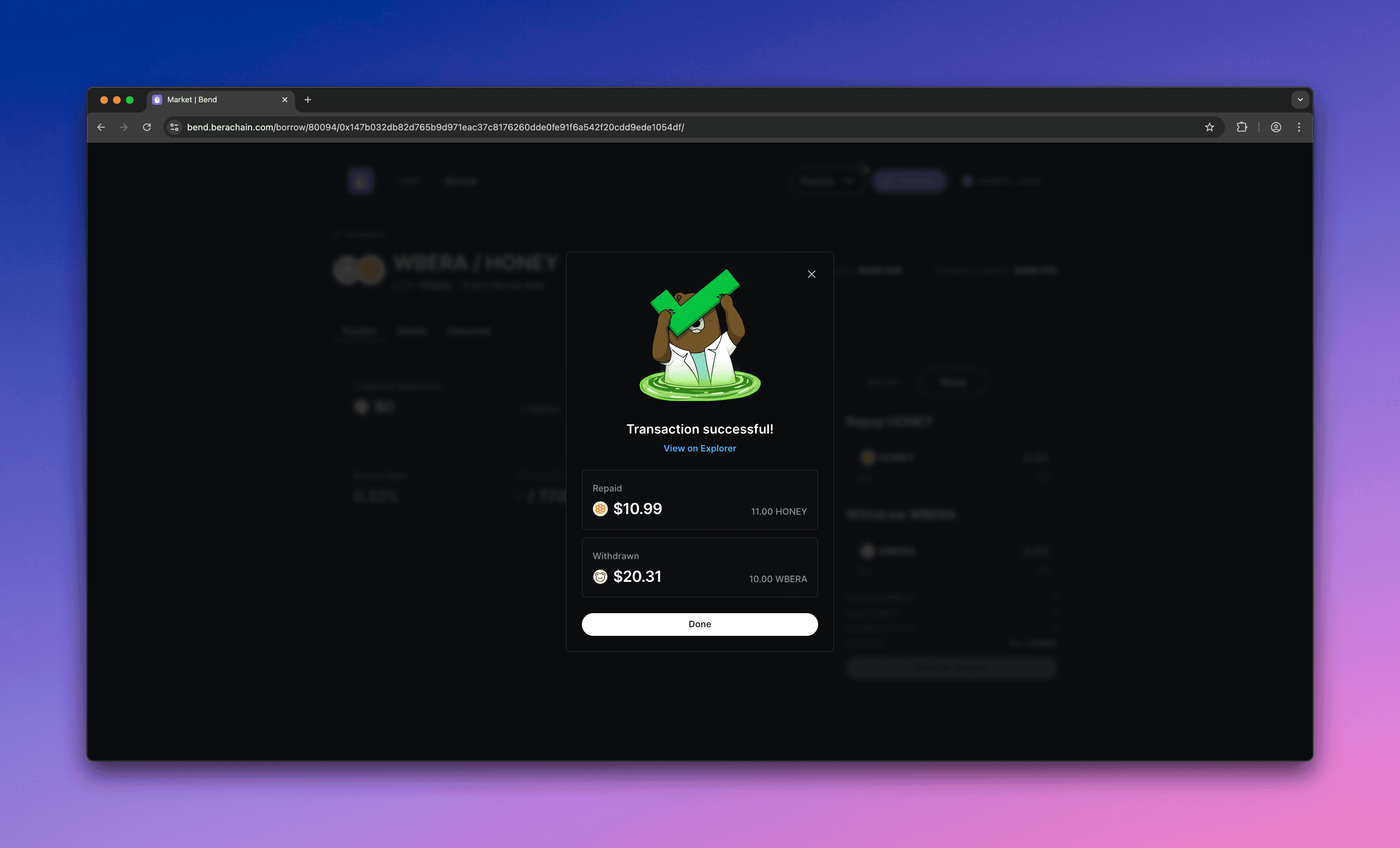
    Confirm the repayment in your wallet.
    <Frame>
      <img src="https://mintcdn.com/berachain-422fce37-mintlify-1066267a/2yeg5lmXXotdcONe/images/bend/repay-confirm-repay.png?fit=max&auto=format&n=2yeg5lmXXotdcONe&q=85&s=73d01774d55c3fb44abc6c3532f1e602" alt="Bend confirm repay" width="4384" height="2654" data-path="images/bend/repay-confirm-repay.png" />
    </Frame>

    <Frame>
      <img src="https://mintcdn.com/berachain-422fce37-mintlify-1066267a/2yeg5lmXXotdcONe/images/bend/repay-successful-confirm-repay.png?fit=max&auto=format&n=2yeg5lmXXotdcONe&q=85&s=b2736d6e896e423bc0527b86c0b98512" alt="Bend successful confirm repay" width="4384" height="2654" data-path="images/bend/repay-successful-confirm-repay.png" />
    </Frame>

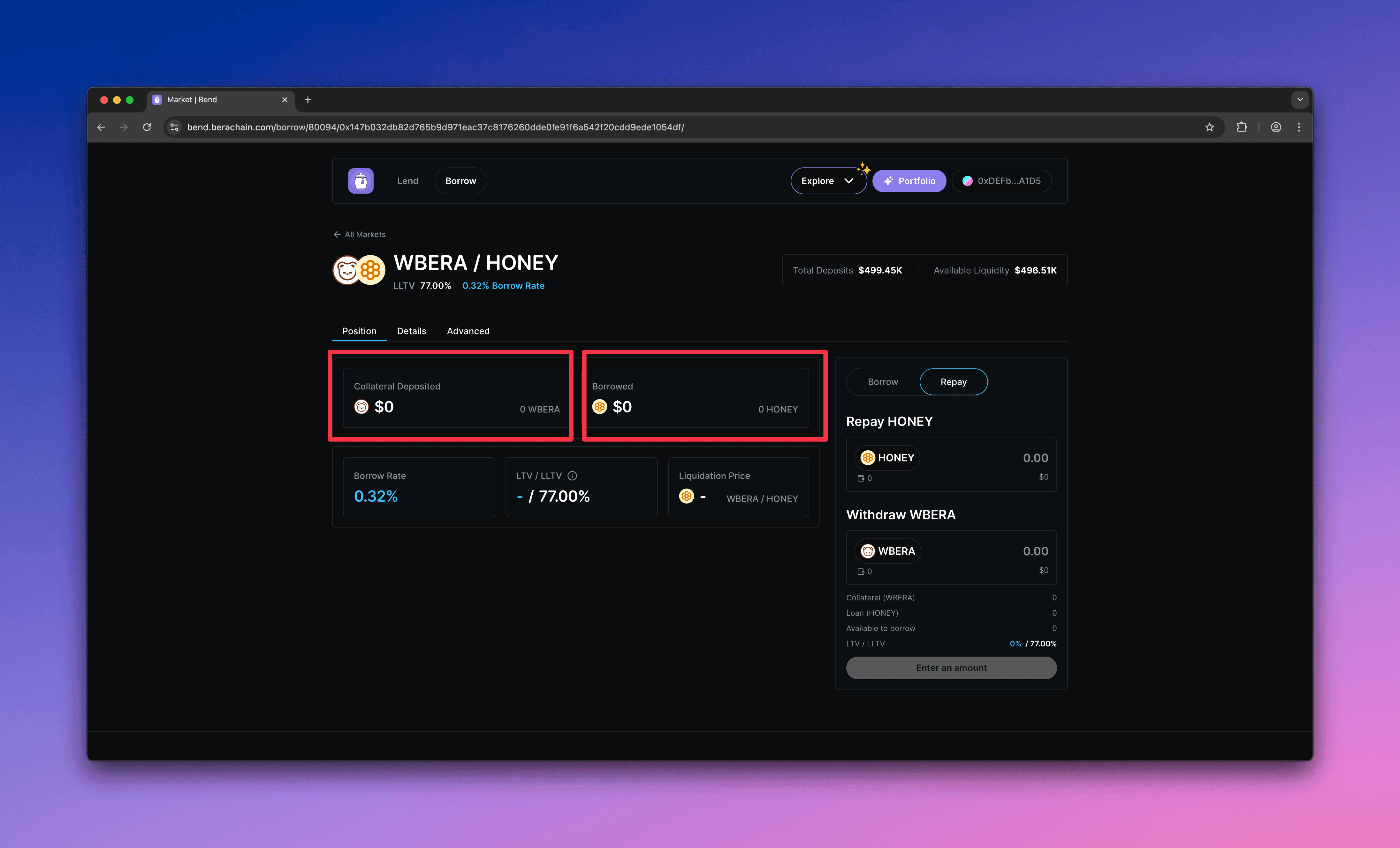
    You should see a zero balance after the repayment.
    <Frame>
      <img src="https://mintcdn.com/berachain-422fce37-mintlify-1066267a/2yeg5lmXXotdcONe/images/bend/repay-successful-repay.png?fit=max&auto=format&n=2yeg5lmXXotdcONe&q=85&s=5d392d33682c9ae73c8294bb5faa40ac" alt="Bend successful repay" width="4384" height="2654" data-path="images/bend/repay-successful-repay.png" />
    </Frame>
  </Step>
</Steps>

You have now supplied collateral, borrowed \$HONEY, and repaid to withdraw your collateral on Bend.